Every pet, every appointment, every dose — organized.
Most pet apps are either a glorified photo album or a clinic portal you'll never log into. Pet HQ sits in between: a genuinely useful place to track what your pets actually need, that you'll open every day, not just when something goes wrong.

See what’s due before it’s overdue.
One list, sorted the way it actually matters: overdue first, then due today, then the rest of the week. Tap the circle to mark something done — no digging through a calendar to find out what you're supposed to be doing right now.

A profile for every pet, not just the first one.
Add every animal in your household — species, breed, sex, birth date, microchip number, identity colour, allergies, and a photo. Each pet gets their own colour-coded thread that follows them through reminders, the calendar, and reports.
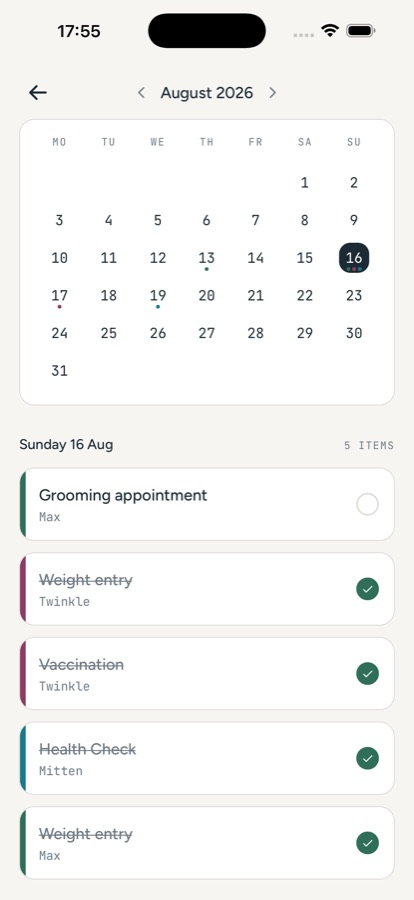
Your pet’s whole month, at a glance.
Every logged entry and upcoming reminder, across every pet, on one shared calendar — colour-coded so you can tell at a glance whose appointment is whose without opening each one.

Watch their weight over time, not just this visit.
Every weigh-in becomes a point on a trend chart, over 3 months, 12 months, 5 years, or their whole life. A slow creep up or down is easy to miss vet visit to vet visit — a lot harder to miss on a graph.

Vaccination records, insurance, and paperwork, on hand.
Log medications, vaccinations, insurance renewals, and vet visits as they happen, and attach the paperwork — a vaccination certificate, an insurance policy, a discharge note — right to the record so it's never buried in a different app or a drawer.

Vet-ready reports in one tap.
Pick a template — full medical history for the vet, a feeding-and-routine briefing for a sitter, or a standalone vaccination record for boarding or travel — choose the pet and date range, and share a clean PDF built from your actual logs.
Ready before the sitter asks
Save an emergency contact and feeding/routine notes on every pet's profile, and pull them into a sitter report whenever you need to leave in a hurry.

Works fully offline. No account required.
Every pet record, photo, and document lives on your device — there's no account to create and no server storing your pets' medical history. Export a full backup whenever you want one.
Stop trying to remember it. Start tracking it.
No account, no ads, and your pets’ records never leave your device.
